Creating an organization
An organization is your company's account in kommuns. The person who creates it automatically gets the Organization Admin permission.
Which organization type should I choose?
| Your situation | Choose |
|---|---|
| You own or run the buildings, facilities, stores or equipment, and have them maintained by your own team or by contractors | Inventory Owner |
| You provide maintenance, repair, service, periodic inspection or engineering to other companies | Expert Organization |
note
An Expert Organization covers both the work that comes from your customers and your own inventory (office, warehouse, service vehicles); you do not need a second organization. Your customers can assign you to their work orders either to do the work or as the Consultant.
Steps
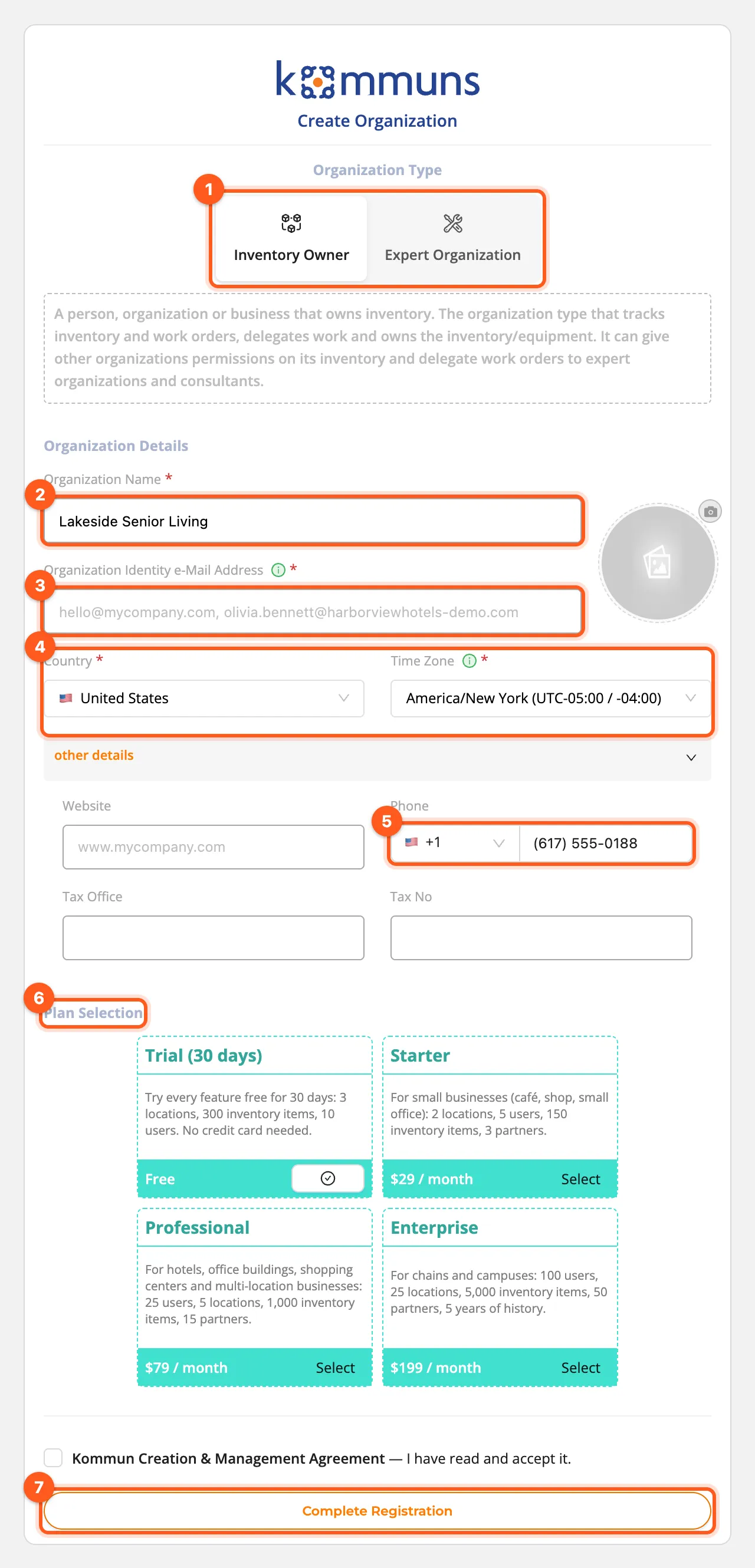
- In the Lobby, click Create Organization.
- Choose the Organization Type. A short description appears under each type.
- Fill in the Organization Details:
- Organization Name: your company's full name, e.g. Harborview Hotels Group.
- Organization Identity e-Mail Address: your organization's unique identity in kommuns. Other companies invite
and find you with this address, so use a company address such as
info@yourcompany.comrather than a personal one. - Click the circle on the right to upload your logo.
- Country and Time Zone: proposed from your browser; check them. Recurring work orders are created at the times of this time zone (a 7:00 AM rule runs at 7:00 AM local time), and the country is the default country code of your organization's phone numbers. You can change both later in Organization details.
- Optionally open other details and enter your website, phone and tax details. Choose the phone's country code from the list (it follows the country you chose) and type the number.
- Under Plan Selection, the free plan of your type is preselected (Trial (30 days) for an Inventory Owner, Expert Free for an Expert Organization). Only a free plan can be chosen here; paid plans are added later (see Plans and billing).
- Read the Kommun Creation & Management Agreement and click Confirm.
- Click Complete Registration. Your organization appears under my organizations in the Lobby.
What next?
Click your organization to open its Home page, then:
For a step-by-step path, follow Quick start: facility owner.